Connection & Authentication
Getting Started
What Is Syncly for GoHighLevel? System Requirements Installation Guide Quick Start: Setup Wizard Plugin Dashboard Overview Free vs Pro: Feature Comparison White-Label Domain Setup WordPress Multisite SetupConnection & Authentication
Connecting via OAuth2 API Scope Detection Multi-Location and Agency Setup Disconnecting and Reconnecting Security Best Practices Connection TroubleshootingField Mapping
How Field Mapping Works Setting Up Field Mapping Sync Direction: To GHL, From GHL, Both Ways Computed and Virtual Fields Extended Field Mapping (Pro) AI-Assisted Field Suggestions (Pro)User Sync & Tag Management
Tag Impact: Preview What a Tag Will Do Before You Apply It Tag Rules: See Every Tag Automation in One Place How User Sync Works Configuring User Sync Settings Bulk User Sync Login Tracking Ping-Pong Prevention Role-Based Tagging System Global Tags (Pro) Sync Preview and Dry Run (Pro) User Profile GHL SectionContent Restrictions
How Tag-Based Restrictions Work Page and Post Metabox Setup [syncly_restrict] Shortcode Gutenberg Restricted Content Block Elementor Widget Conditions (Pro) Archive and REST API Protection (Pro) Admin Bypass and Override Rules (Pro)Forms & Shortcodes
Gravity Forms — Conditional Sync & Automation Embedding Syncly Forms: Overview [syncly_form] Shortcode [syncly_user_meta] Shortcode Syncly Form Gutenberg Block Syncly Form Elementor Widget Per-Form Submission Limits (Pro) Form Autofill and Logged-In-Only Mode Contact Form 7 IntegrationWebhooks & Bulk Import
Setting Up Inbound Webhooks Webhook Event Types Bulk Import from GoHighLevel Webhook Troubleshooting Ping-Pong Prevention and GuardsGohighlevel WooCommerce Integration
WooCommerce Auto-Book Calendar Appointments (Pro) WooCommerce Purchase Workflow Enrollment (Pro) WooCommerce Memberships: Grant Plans Automatically from a GHL Tag (Pro) WooCommerce Subscriptions: Grant Access Automatically from a GHL Tag (Pro) WooCommerce Integration Overview Per-Product GHL Tags (Pro) Abandoned Cart Tracking (Pro) Lead-to-Customer Conversion (Pro) WooCommerce Extended Field Mapping (Pro)LearnDash Integration
LearnDash Integration Overview (Pro) Course Enrollment and Completion Tags (Pro) Tag-Based Auto-Enrollment (Pro) Quiz Score-Based Threshold Tagging (Pro) Lesson and Topic Completion Tags (Pro) Syncing Course Progress to GHL (Pro) LearnDash Group Sync (Pro) LearnDash Extended Field Mapping (Pro)BuddyBoss Integration
BuddyBoss Group Sync to GHL Custom Objects BuddyBoss Group Admin Metabox Bulk Group Sync BuddyBoss XProfile Field Mapping (Pro) Family BuddyBoss Groups (Pro)Pro Features
Gravity Forms — Conditional Sync & Automation Custom Objects: Overview (Pro) Mapping Post Types to GHL Custom Objects (Pro) Custom Object Contact Associations (Pro) Family Relationships: Overview (Pro) Managing Family Members and Invitations (Pro) Family Tag Inheritance (Pro) Conditional Navigation Menus (Pro) [syncly_family_manager] Shortcode (Pro) Analytics Dashboard (Pro) Public REST API Endpoints (Pro)Sync Engine & Troubleshooting
How the Sync Queue Works Sync Logs and Reading Them Enhanced Sync Logs (Pro) Rate Limits and API Quotas Auto-Login Links Email Notifications Setup Advanced Settings (Cache, Batch Size, Retention) Common Issues and Solutions Frequently Asked Questions Uninstalling the PluginConnection & Authentication
Security Best Practices
Syncly Security Best Practices
Syncly security is built into every layer of the WordPress-to-GoHighLevel integration, protecting authentication, authorization, API requests, webhooks, and administrative operations from common security threats and unauthorized access.
OAuth 2.0 Authentication
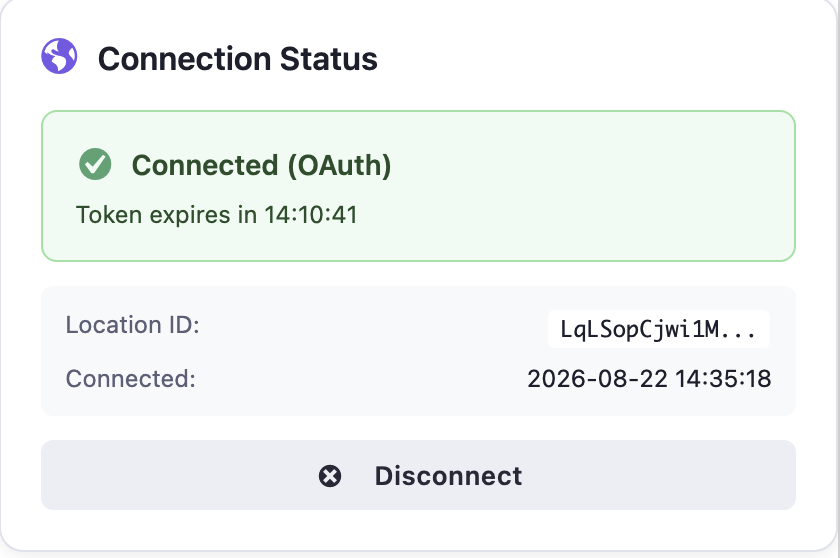
Syncly uses OAuth 2.0 to connect your WordPress site with GoHighLevel.
You do not need to enter or store your GoHighLevel account password in Syncly. Authorization is handled through GoHighLevel’s OAuth flow, and Syncly receives the credentials required to communicate with the authorized account.
OAuth credentials are stored securely by Syncly and are not exposed through the plugin’s normal administrative interface.
Encrypted Credential Storage
Sensitive OAuth credentials are protected before being stored in the WordPress database.
Syncly does not intentionally store OAuth credentials as readable plain text in the database. Encryption is tied to the WordPress installation’s security configuration.
If the WordPress security keys and salts are changed, previously encrypted credentials may no longer be decryptable. In that situation, the GoHighLevel connection may need to be authorized again.
Webhook Signature Verification
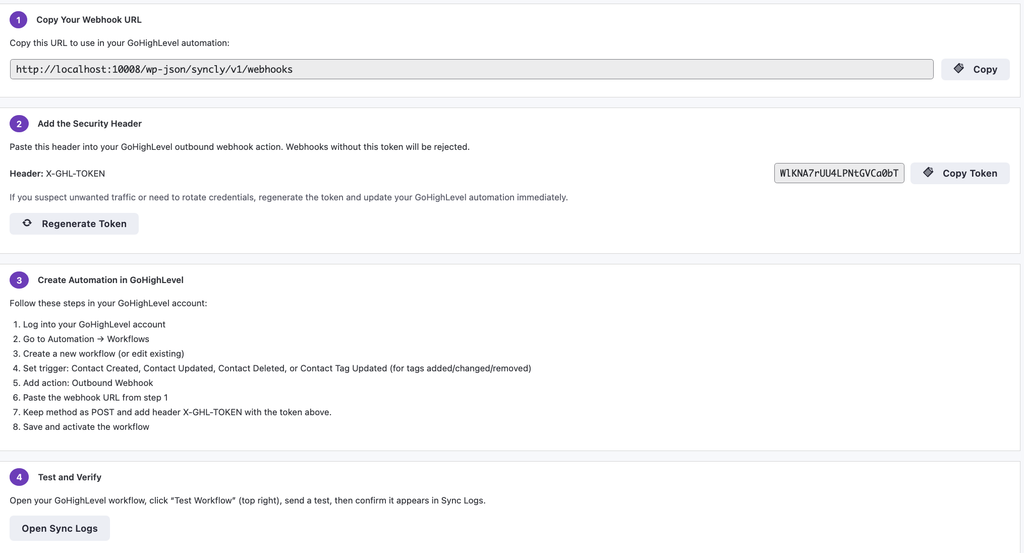
Syncly protects inbound webhook requests by verifying their authenticity before processing the payload.
Webhook requests are validated using a shared secret/signature mechanism. Requests that do not contain valid authentication information are rejected instead of being processed as trusted Syncly events.
This prevents arbitrary third parties from sending forged webhook requests directly to Syncly endpoints.
WordPress Nonce Verification
Syncly uses WordPress nonces to protect administrative actions and AJAX requests against Cross-Site Request Forgery (CSRF).
Requests that require nonce verification must include a valid nonce generated by WordPress. Invalid or missing nonces are rejected.
This ensures that authenticated users cannot be silently tricked into performing protected Syncly actions from an unauthorized request.

Capability-Based Access Control
Syncly’s administrative functionality is restricted to authorized WordPress users.
Plugin settings and other privileged configuration screens are only available to users with the required WordPress capabilities.
Being logged into WordPress alone does not automatically grant access to protected Syncly functionality.
This follows WordPress’s native capability and authorization model rather than relying only on the visibility of the settings interface.
Protected REST and AJAX Endpoints
Syncly’s server-side endpoints validate requests before performing protected operations.
Depending on the endpoint, validation can include:
- WordPress authentication
- Capability checks
- Nonce verification
- Request validation
- Webhook authentication
- Input sanitization
Endpoints do not rely solely on the frontend interface for security. Server-side validation is performed before protected operations are executed.
Input Validation and Sanitization
Data received by Syncly is validated and sanitized before it is used or stored.
This applies to data received through administrative interfaces, AJAX requests, REST endpoints, synchronization operations, and other externally supplied input.
Where data is rendered back to the browser, Syncly uses appropriate WordPress escaping mechanisms to prevent untrusted data from being interpreted as executable HTML or JavaScript.
Secure API Communication
Communication between Syncly and GoHighLevel takes place through authenticated API requests.
Syncly does not require users to manually expose their GoHighLevel credentials to WordPress forms or frontend JavaScript.
API credentials and authorization information are handled server-side where possible, keeping sensitive authentication data away from publicly accessible browser code.
Sensitive Data Redaction
Syncly avoids exposing sensitive authentication information in normal synchronization logs.
Credentials, authorization information, and other sensitive values should not be required when reviewing routine sync activity.
This allows logs to remain useful for troubleshooting without unnecessarily exposing authentication data.
Defense in Depth
Syncly does not rely on a single security mechanism.
Protected operations can be covered by multiple layers of protection:
Authentication → Authorization → Request Validation → Input Validation → Secure Processing
This means that reaching a Syncly endpoint does not by itself grant permission to perform the underlying operation.
Security controls are enforced server-side rather than relying exclusively on frontend restrictions.