Forms & Shortcodes
Getting Started
What Is Syncly for GoHighLevel? System Requirements Installation Guide Quick Start: Setup Wizard Plugin Dashboard Overview Free vs Pro: Feature Comparison White-Label Domain Setup WordPress Multisite SetupConnection & Authentication
Connecting via OAuth2 API Scope Detection Multi-Location and Agency Setup Disconnecting and Reconnecting Security Best Practices Connection TroubleshootingField Mapping
How Field Mapping Works Setting Up Field Mapping Sync Direction: To GHL, From GHL, Both Ways Computed and Virtual Fields Extended Field Mapping (Pro) AI-Assisted Field Suggestions (Pro)User Sync & Tag Management
Tag Impact: Preview What a Tag Will Do Before You Apply It Tag Rules: See Every Tag Automation in One Place How User Sync Works Configuring User Sync Settings Bulk User Sync Login Tracking Ping-Pong Prevention Role-Based Tagging System Global Tags (Pro) Sync Preview and Dry Run (Pro) User Profile GHL SectionContent Restrictions
How Tag-Based Restrictions Work Page and Post Metabox Setup [syncly_restrict] Shortcode Gutenberg Restricted Content Block Elementor Widget Conditions (Pro) Archive and REST API Protection (Pro) Admin Bypass and Override Rules (Pro)Forms & Shortcodes
Gravity Forms — Conditional Sync & Automation Embedding Syncly Forms: Overview [syncly_form] Shortcode [syncly_user_meta] Shortcode Syncly Form Gutenberg Block Syncly Form Elementor Widget Per-Form Submission Limits (Pro) Form Autofill and Logged-In-Only Mode Contact Form 7 IntegrationWebhooks & Bulk Import
Setting Up Inbound Webhooks Webhook Event Types Bulk Import from GoHighLevel Webhook Troubleshooting Ping-Pong Prevention and GuardsGohighlevel WooCommerce Integration
WooCommerce Auto-Book Calendar Appointments (Pro) WooCommerce Purchase Workflow Enrollment (Pro) WooCommerce Memberships: Grant Plans Automatically from a GHL Tag (Pro) WooCommerce Subscriptions: Grant Access Automatically from a GHL Tag (Pro) WooCommerce Integration Overview Per-Product GHL Tags (Pro) Abandoned Cart Tracking (Pro) Lead-to-Customer Conversion (Pro) WooCommerce Extended Field Mapping (Pro)LearnDash Integration
LearnDash Integration Overview (Pro) Course Enrollment and Completion Tags (Pro) Tag-Based Auto-Enrollment (Pro) Quiz Score-Based Threshold Tagging (Pro) Lesson and Topic Completion Tags (Pro) Syncing Course Progress to GHL (Pro) LearnDash Group Sync (Pro) LearnDash Extended Field Mapping (Pro)BuddyBoss Integration
BuddyBoss Group Sync to GHL Custom Objects BuddyBoss Group Admin Metabox Bulk Group Sync BuddyBoss XProfile Field Mapping (Pro) Family BuddyBoss Groups (Pro)Pro Features
Gravity Forms — Conditional Sync & Automation Custom Objects: Overview (Pro) Mapping Post Types to GHL Custom Objects (Pro) Custom Object Contact Associations (Pro) Family Relationships: Overview (Pro) Managing Family Members and Invitations (Pro) Family Tag Inheritance (Pro) Conditional Navigation Menus (Pro) [syncly_family_manager] Shortcode (Pro) Analytics Dashboard (Pro) Public REST API Endpoints (Pro)Sync Engine & Troubleshooting
How the Sync Queue Works Sync Logs and Reading Them Enhanced Sync Logs (Pro) Rate Limits and API Quotas Auto-Login Links Email Notifications Setup Advanced Settings (Cache, Batch Size, Retention) Common Issues and Solutions Frequently Asked Questions Uninstalling the PluginForms & Shortcodes
Gravity Forms — Conditional Sync & Automation
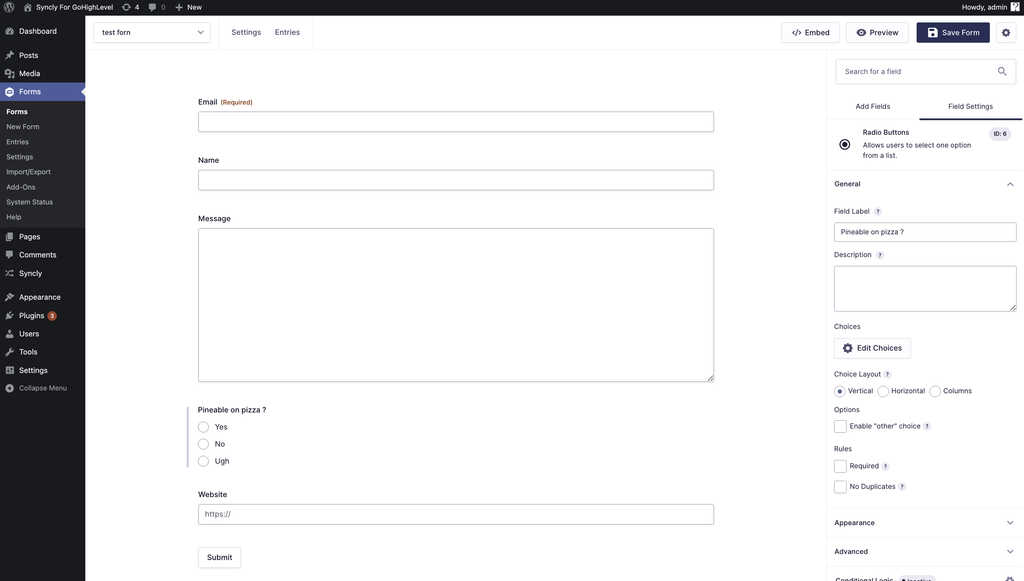
Syncly Gravity Forms Integration gives you direct sync to GoHighLevel with more control over what gets synced, when it gets synced, and what happens after the contact is created or updated.
Syncly Pro adds conditional syncing, GoHighLevel tags, contact timeline notes, delayed delivery, spam protection, submission replay, and workflow enrollment on top of the standard Gravity Forms integration.
Before you start
You need:
- Gravity Forms installed and active
- Syncly installed and connected to GoHighLevel
- (optionally) Syncly Pro activated
Go to:
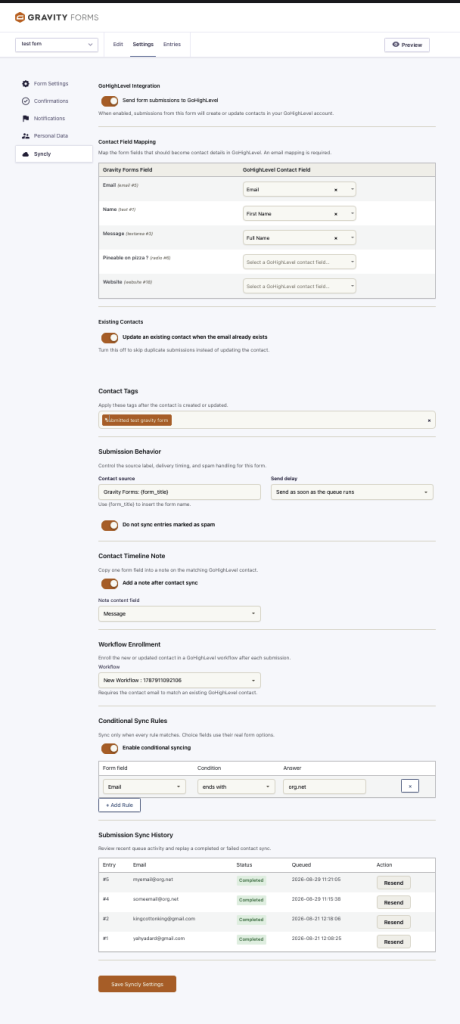
Gravity Forms → Forms → Settings → Syncly
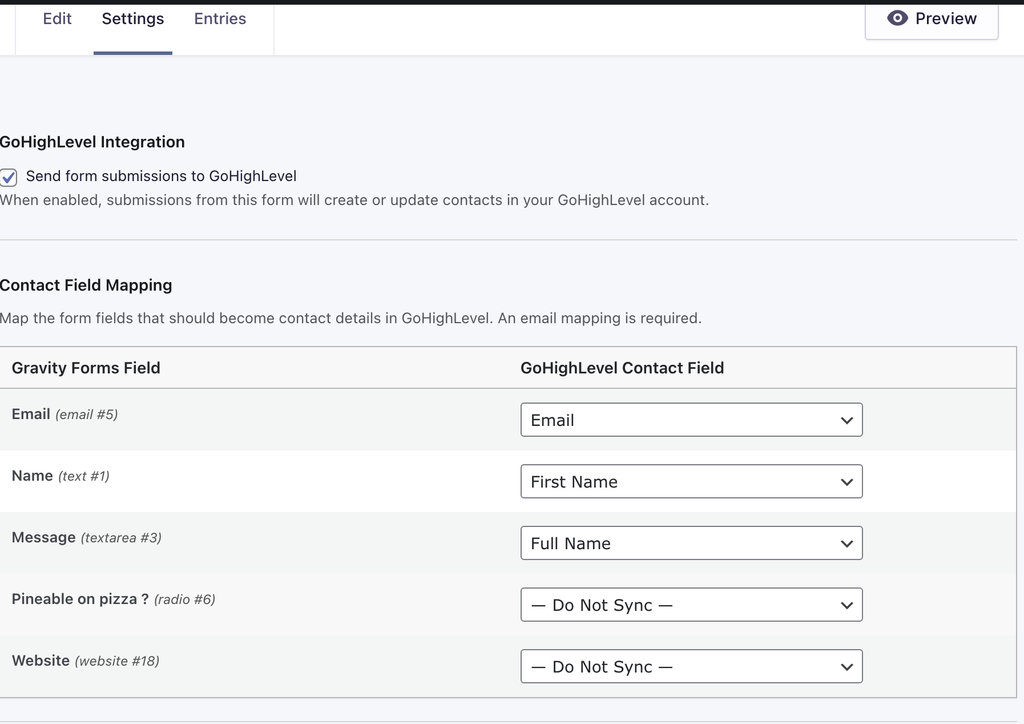
Enable Send form submissions to GoHighLevel.
Map at least one form field to the GoHighLevel Email field. Syncly uses the email address to create or identify the contact.
Conditional Syncing
Conditional syncing lets you decide which submissions are allowed into the GoHighLevel sync queue.
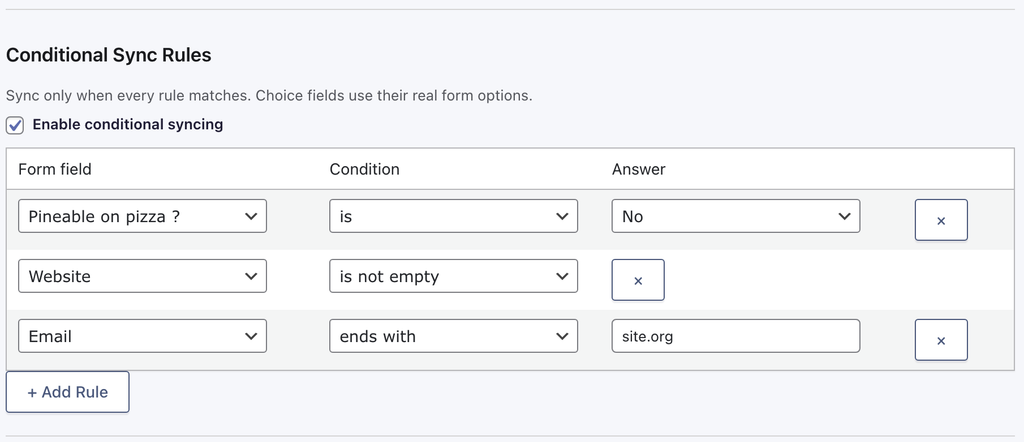
Enable Conditional Syncing, then add one or more rules. Each rule consists of Form field → Condition → Answer.
Conditions
Syncly provides standard text comparisons including is, is not, contains, does not contain, starts with, ends with, is empty, and is not empty. Numeric fields also support greater than, greater than or equal to, less than, less than or equal to, between, and not between.
For fields with predefined choices, Syncly uses the actual answers configured in your Gravity Form.
Multiple rules
Rules use AND logic. Every configured rule must match before Syncly synchronizes the submission.
Control What Happens After Submission
Conditional syncing controls whether a submission enters the sync process. Once it does, Syncly Pro gives you several additional actions.
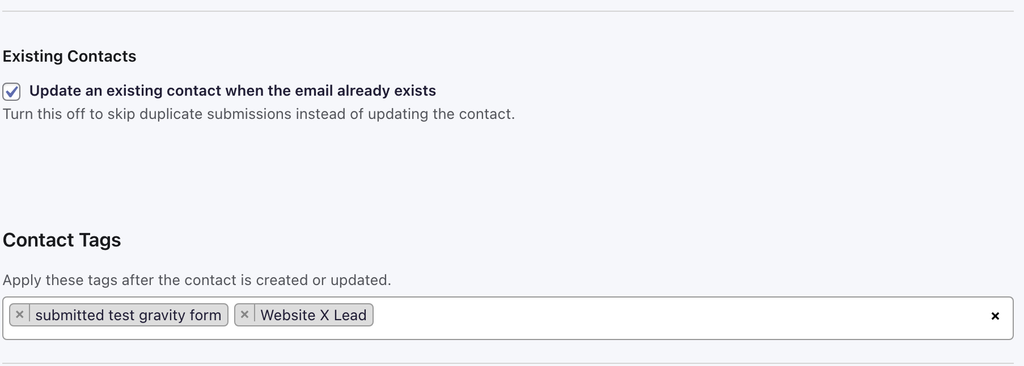
Apply GoHighLevel Tags
Automatically apply selected GoHighLevel tags after the contact is created or updated. Select one or multiple tags under Contact Tags.
Enroll the Contact in a GoHighLevel Workflow
Syncly Pro can automatically enroll the submitted contact in a selected GoHighLevel workflow after the Gravity Forms submission is synchronized.
In the Gravity Forms Syncly settings, enable the workflow enrollment option and select the published GoHighLevel workflow you want to use. When a qualifying submission is processed, Syncly resolves the matching GoHighLevel contact and queues enrollment into the selected workflow.
This is useful when a form submission should start a specific CRM automation, such as a lead nurture sequence, application follow-up, onboarding process, or sales workflow.
Conditional syncing can be used together with workflow enrollment. If the submission does not satisfy the configured conditions, it is skipped and the workflow is not enrolled.
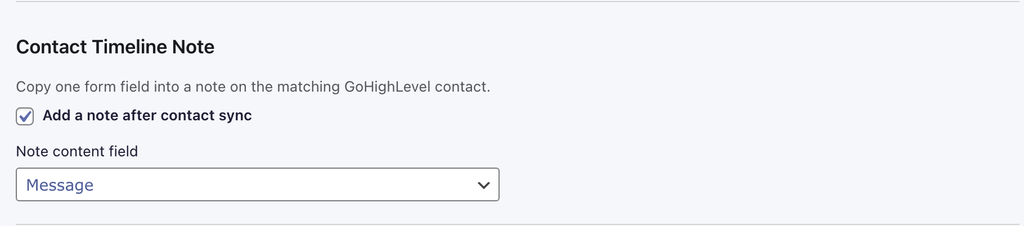
Add a Contact Timeline Note
Syncly can take the value from a selected Gravity Forms field and add it as a note to the matching GoHighLevel contact.
Enable Add a note after contact sync, then select the field containing the content you want to save.
Control Delivery
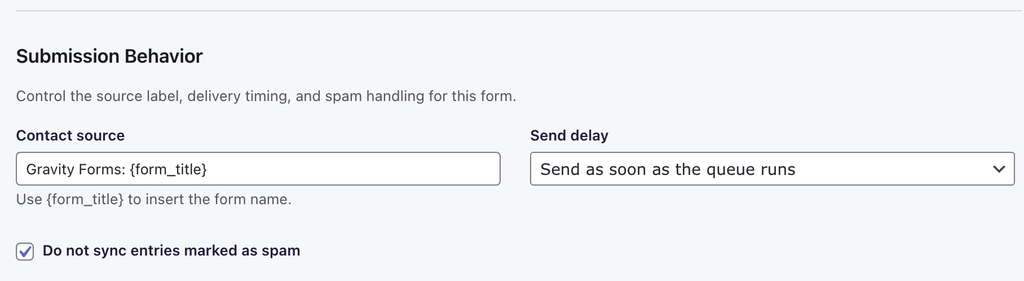
Syncly Pro lets you control when queued submissions are sent. Available delays are immediately, 5 minutes, 15 minutes, 30 minutes, and 1 hour.
Custom Contact Source
Set the GoHighLevel contact source generated by the form. You can use Gravity Forms: {form_title}, where {form_title} is automatically replaced with the actual Gravity Forms form name.
Automatically Skip Spam
Enable Do not sync entries marked as spam to keep known spam submissions out of your CRM.
Existing Contacts
Syncly can update an existing GoHighLevel contact when the submitted email address already exists. You can also disable this behavior if you want duplicate submissions to be skipped instead.
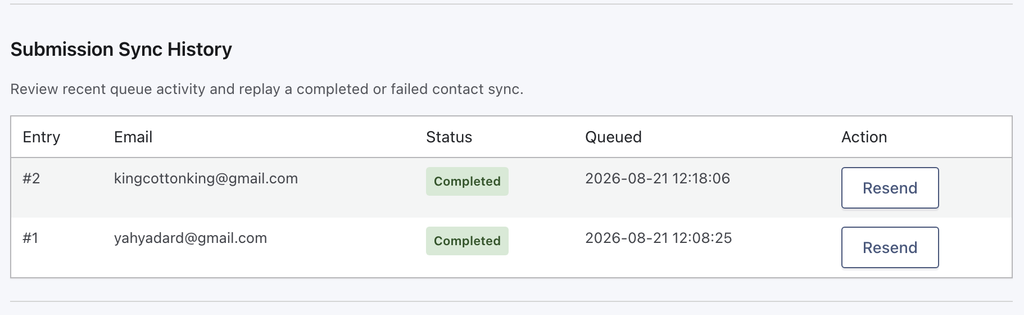
Submission Sync History
Syncly Pro gives you visibility into recent Gravity Forms synchronization activity directly inside the form settings. You can resend failed submissions without requiring the visitor to submit the form again.
Putting It Together
You can combine these features into a complete submission workflow:
Visitor submits Gravity Form
            ↓
Conditional rules checked before syncing
            ↓
All rules match?
       ↙           ↘
     No             Yes
     ↓               ↓
   Skip          Queue submission
                     ↓
              Optional delay
                     ↓
             Create / update
                GHL contact
                     ↓
             Apply selected tags
                     ↓
             Add timeline note
                     ↓
             Enroll in workflow
                     ↓
                 Completed
Use conditions to control who gets synced, tags to control what happens next, notes to preserve submission context, workflow enrollment to start CRM automation, and the queue/history to control and recover delivery.